
Advantages of headphones
Ambient listening mode
- Built-in speakers and microphones for ambient listening (stereo, 5 volume levels)
Wireless technology
- Bluetooth mode and an external microphone on the rod for negotiations using a smartphone or radio station with a noise level of up to 95 dB
Comfort
- Lightweight, soft shock absorbers provide a comfortable grip
Reliability
- High capacity built-in rechargeable battery: 800 mAh
Headphone device
|
 |
- Headphones and phone can be up to 10 meters apart from each other while staying connected
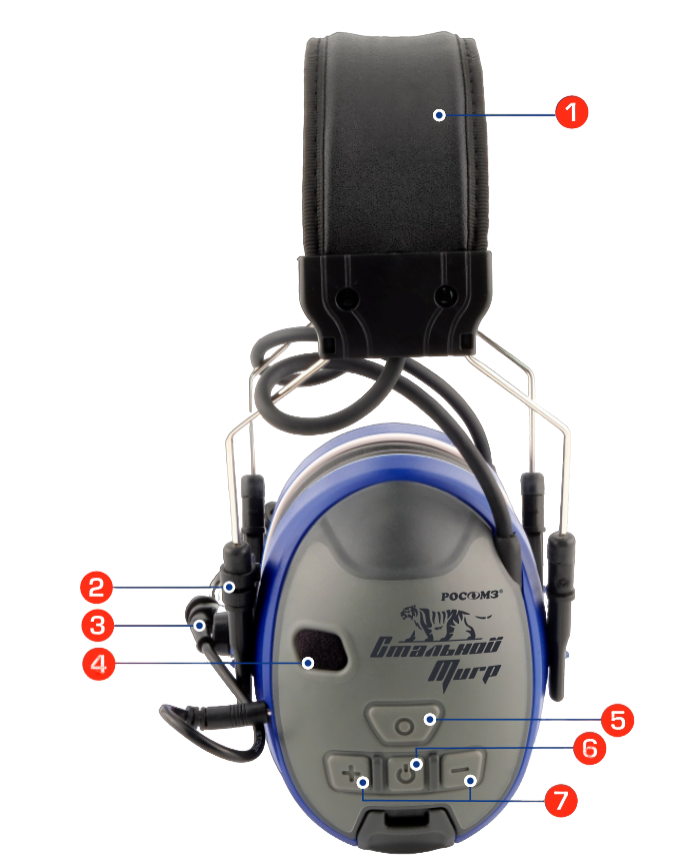
- Volume control on the case, headphones work in stereo ambient listening mode
- Effective noise insulation and a modern speaker system ensure high sound quality
- The microphone is easily installed in a convenient position
- Soft shock absorbers filled with porous material, stainless steel headband ensure uniform and constant pressure distribution and maximum comfort
- Performing work in open spaces, except in rainy weather
The SOMZ-51 Steel Tiger headphones can be used as a wireless anti-noise headset for a walkie-talkie, while the walkie-talkie used must also support Bluetooth operation.
Size range and noise absorption index for choosing the right size of headphones
Dimensions
- S is a small size (wearing height range from 115 to 130 mm and wearing width from 125 to 145 mm);
- M is the average size of headphones (the wearing height range includes all sizes S, M and L, the wearing width range of size M includes 125 to 155 mm);
- L - is an increased size (wearing height range from 130 to 140 mm and wearing width from 145 to 155 mm).
Indicators
Frequency: 125; 250; 500; 1000; 2000; 4000; 8000
Mf, dB: 23,4; 28,4; 30,4; 32,1; 34,8; 36,1; 39,1
Sf, dB: 3,8; 3,2; 3,4; 4,2; 4,5; 4,4; 3,4
APVf (Mf -Sf), dB: 20.2; 25.7; 27.5; 28.6; 31.0; 32.4; 36.2
Noise absorption at frequencies, dB:
- high H - 39
- average M - 30
- low L - 19
Single absorption index noise, dB (SNR): 34
Instructions for use
 |
|
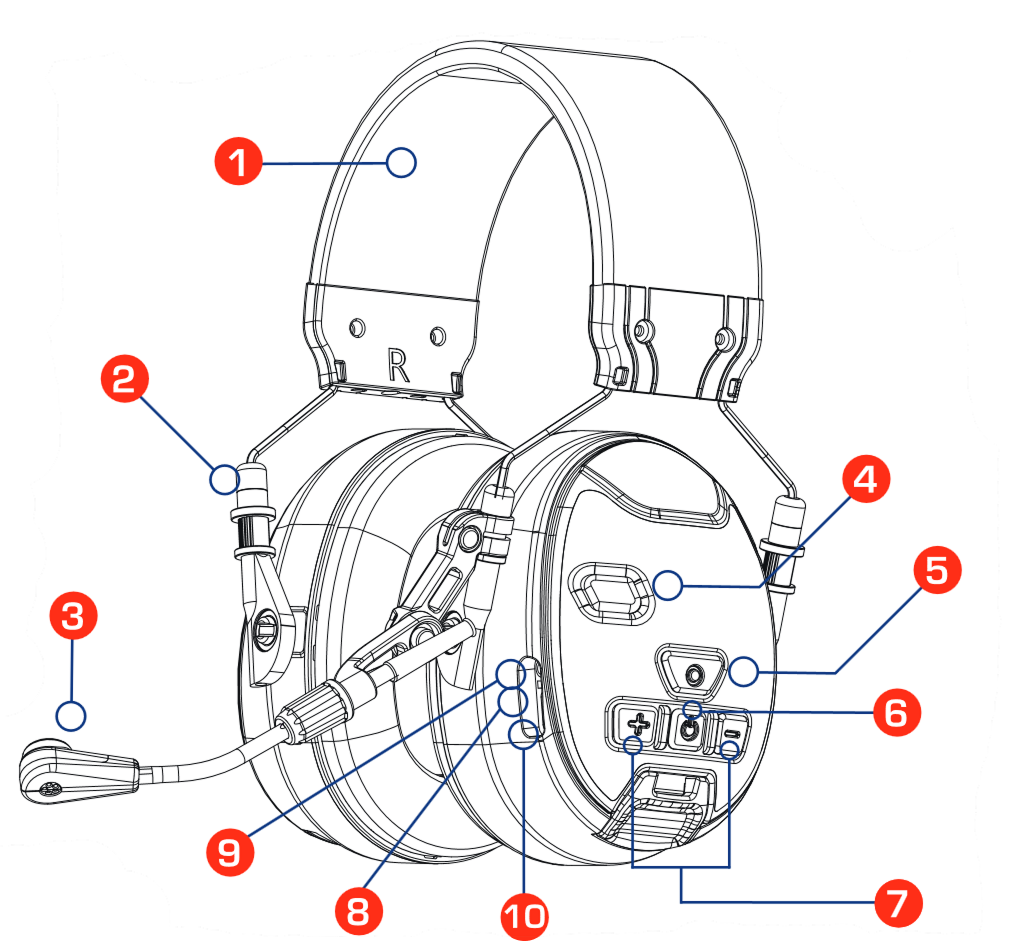
Figure 1:
|
Bluetooth mode
- Press and hold button 5 (see Fig. 1) within two seconds. After switching on, you will hear "Bluetooth Mode", and the LED indicator is 8 (see Fig. 1) Flashing blue and red colors.
- To connect to your smartphone, select the C51 device in the smartphone menu. After successfully pairing the selected device, you will hear "Bluetooth Mode. The connection is established." If the device is not connected to the mobile phone for more than five minutes, it will automatically exit Bluetooth mode, you will hear "Ambient listening mode".
- After switching to Bluetooth mode, the ambient listening and noise reduction mode is still maintained, press the "+" or "-" buttons to adjust the ambient sound volume.
- Press button 5 (see Fig. 1) to answer an incoming call. To reject a call, hold down the 5 button (see Fig. 1) within 2 seconds. Press button 5 (see Fig. 1) to hang up the phone during a conversation.
- Press button 5 (see Fig. 1) to play music in connection mode, and then press the 5 button (see Fig. 1) to pause music playback.
- Press and hold button 5 (see Fig. 1) Within two seconds, you will hear "Ambient Listening Mode", which means that you have exited Bluetooth mode and switched to ambient listening mode. In Bluetooth mode, the microphone can be used to make calls or send voice messages.
Ambient listening mode
- Press and hold button 6 (see Figure 1) for two seconds to turn on the device and switch to noise reduction mode when you hear "Ambient Listening Mode". After turning on, the volume will be the same as when it was last turned on.
- Press the "+" button to increase the sound volume, keep pressing, the volume will increase to maximum. Press the "–" button to decrease the sound volume, keep pressing to decrease the sound volume or to mute the sound. There are only 5 volume levels to adjust.
- Press and hold button 6 (see Fig. 1) Within two seconds to turn off, you will hear "Power off".
Charging instructions
To charge, connect the charger cable to the headphones in connector 10 (see Fig. 1). When the headset is in charging mode, the indicator lights up red, and when the headset is fully charged, it turns green.
Do not open the battery compartment or replace the battery yourself.
For more information, please contact the manufacturer.
Technical specifications
- Working time on a full battery charge* is 32 hours
- Battery capacity - 800 mAh
- Charging current - 280 mA
- Current consumption is 15 mA (at 70% Bluetooth playback volume)
- Charging temperature - from 0°C to +50°C
*the maximum operating time on a full battery charge is indicated at a temperature of +20 °C
Anti-noise headphones ROSOMZ on Enex